01189998819991197253

joined 2 years ago
MODERATOR OF
[–] 01189998819991197253 40 points 6 days ago (2 children)

Lol Gentoo over here in two categories

[–] 01189998819991197253 1 points 1 week ago

I’m also not convinced signal is future proof in terms of privacy (open to your argument against, it’s just a hunch)

No argument against. It's a centralized platform, and is not immune. It's just the best one thus far.

I left a link in another comment to a HowTo on moving all your stickers from Whatsapp to Signal. Someone had a hard time opening it, so I'll copy it below as a crude copy/paste.

You don't have to explain yourself. First of all, if it's important to you, it's important. Secondly, I completely understand your needing them, even without your explanation.

Hello, I saw a few people asking this question*, so I thought of preparing a short guide. Basically, you need two things to carry stickers; firstly, your stickers as webp files (because WhatsApp saves them in this format) and secondly, Signal's desktop application. I guess the easiest way to move webp's is by using WhatsApp's own "export" feature: ... You can send all the WhatsApp stickers to yourself or one of your chats so that you can export all your stickers effectively. To export chat in WhatsApp on phone, you need to Step 1 Go to the chat that include all your WhatsApp stickers, it might be the one you sent all the WhatsApp stickers to. Step 2 For iOS devices, tap the contact name of the chat, scroll down and you will see the Export Chat, click on it. For Android, click the three dots on top right corner, from the pop up asking if you like to attach media files, click Attach Media because we are exporting WhatsApp stickers which are media files. Step 3 After the process of exporting data, you can choose which app to export to. Normally people will choose email to export. You can also choose Google Drive, or anyone you like. The chat will be exported as a zip file include a txt. file and a folder with all the media files, so it’s better that you can receive on computer. Source: imyfone Android users can even transfer it directly to their computers via cable, but I think this is the easiest way for IOS. Then you could simply download your stickers and upload them to Signal database by using Signal's desktop client: Step 1 Open Signal Desktop and select File > Create/Upload Sticker Pack.
Step 2 Add up to 200 stickers. Drag and drop to re-order. Hover over a sticker to preview in light and dark theme. Step 3 Select one emoji per sticker.
Step 4 Enter a Title and Author. (Optional) Select a new cover sticker. Make changes now. Stickers are not linked to the Signal Creator's account. You cannot edit a sticker pack after uploading. Step 5 Copy the link to share your sticker pack outside of Signal. Step 6 Use the hashtag #makeprivacystick to help other people find the URLs for any custom sticker packs that you would like to make publicly accessible. Step 7 Select the sticker icon in your chat and select a sticker to automatically send. Source: Signal And there is an unoffical site for finding or sharing stickers too: Signal Stickers If you want to create your own stickers by Adobe Photoshop there is a psd file for this to use, just don't forget to save your files as png, webp or apng: WhatsApp Let me also make a warning that I haven't seen on the internet. All of the stickers in your sticker package appear when the sticker is clicked. Keep that in mind. I hope this was helpful. Edit: I just saw FutureSwim's great guide, but I think this short guide still could be useful for those who

[–] 01189998819991197253 1 points 1 week ago* (last edited 1 week ago)

It works for me. Not sure why it's not working for you.

Here's a crude copy/paste.

Hello, I saw a few people asking this question*, so I thought of preparing a short guide. Basically, you need two things to carry stickers; firstly, your stickers as webp files (because WhatsApp saves them in this format) and secondly, Signal's desktop application. I guess the easiest way to move webp's is by using WhatsApp's own "export" feature: ... You can send all the WhatsApp stickers to yourself or one of your chats so that you can export all your stickers effectively. To export chat in WhatsApp on phone, you need to Step 1 Go to the chat that include all your WhatsApp stickers, it might be the one you sent all the WhatsApp stickers to. Step 2 For iOS devices, tap the contact name of the chat, scroll down and you will see the Export Chat, click on it. For Android, click the three dots on top right corner, from the pop up asking if you like to attach media files, click Attach Media because we are exporting WhatsApp stickers which are media files. Step 3 After the process of exporting data, you can choose which app to export to. Normally people will choose email to export. You can also choose Google Drive, or anyone you like. The chat will be exported as a zip file include a txt. file and a folder with all the media files, so it’s better that you can receive on computer. Source: imyfone Android users can even transfer it directly to their computers via cable, but I think this is the easiest way for IOS. Then you could simply download your stickers and upload them to Signal database by using Signal's desktop client: Step 1 Open Signal Desktop and select File > Create/Upload Sticker Pack.
Step 2 Add up to 200 stickers. Drag and drop to re-order. Hover over a sticker to preview in light and dark theme. Step 3 Select one emoji per sticker.
Step 4 Enter a Title and Author. (Optional) Select a new cover sticker. Make changes now. Stickers are not linked to the Signal Creator's account. You cannot edit a sticker pack after uploading. Step 5 Copy the link to share your sticker pack outside of Signal. Step 6 Use the hashtag #makeprivacystick to help other people find the URLs for any custom sticker packs that you would like to make publicly accessible. Step 7 Select the sticker icon in your chat and select a sticker to automatically send. Source: Signal And there is an unoffical site for finding or sharing stickers too: Signal Stickers If you want to create your own stickers by Adobe Photoshop there is a psd file for this to use, just don't forget to save your files as png, webp or apng: WhatsApp Let me also make a warning that I haven't seen on the internet. All of the stickers in your sticker package appear when the sticker is clicked. Keep that in mind. I hope this was helpful. Edit: I just saw FutureSwim's great guide, but I think this short guide still could be useful for those who

[–] 01189998819991197253 1 points 1 week ago* (last edited 1 week ago) (2 children)

~~Reddit, I know, but here~~ Archived link as an easy way to transfer your stickers from Whatsapp to Signal en masse.

Edit. Changed reddit link to archived link.

[–] 01189998819991197253 1 points 1 week ago (2 children)

Live location is shared as needed. This means the app isn't consciously transmitting your location, but you can send your location whenever you want by pressing the + then location. This design choice is more private.

As for the stickers, yes, your WhatsApp ones won't transfer (unless something changed), but they have plenty premade packs to choose from and you can make your own sticker packs (super easy).

[–] 01189998819991197253 1 points 1 week ago

I was thinking the exact opposite thing, but about the people behind me...

[–] 01189998819991197253 5 points 1 week ago

I hope Microsoft Windows crashes and burns

Funny you should say that...

[–] 01189998819991197253 8 points 1 week ago

...for now.

I swear. Society at large will never learn from Microsoft's games.

[–] 01189998819991197253 2 points 1 week ago

Thanks. But I've tried it. Doesn't work. It requires a firmware version that is one version higher than what's on mine. With no way to connect to it, there's no way to update the firmware.

[–] 01189998819991197253 8 points 1 week ago

I've used both, and highly prefer this over any of the ipods of the generation. This is partly because of the drag and drop, but mostly because it didn't gaf whether the mp3 came from itunes or ripped with Audio Grabber. Ipods all cared, and I had to trick them into playing Audio Grabber files by encoding them to m4a. Absolutely bonkers.

[–] 01189998819991197253 22 points 1 week ago (7 children)

Not to brag, but this is my mp3 in 2026:

It plays wonderfully. But only works with Windows XP for transfers...

[–] 01189998819991197253 1 points 1 week ago

Oh, that's good. I always plan on reading the whole series, but you know how life goes sometimes. So, I like that each book holds its own.


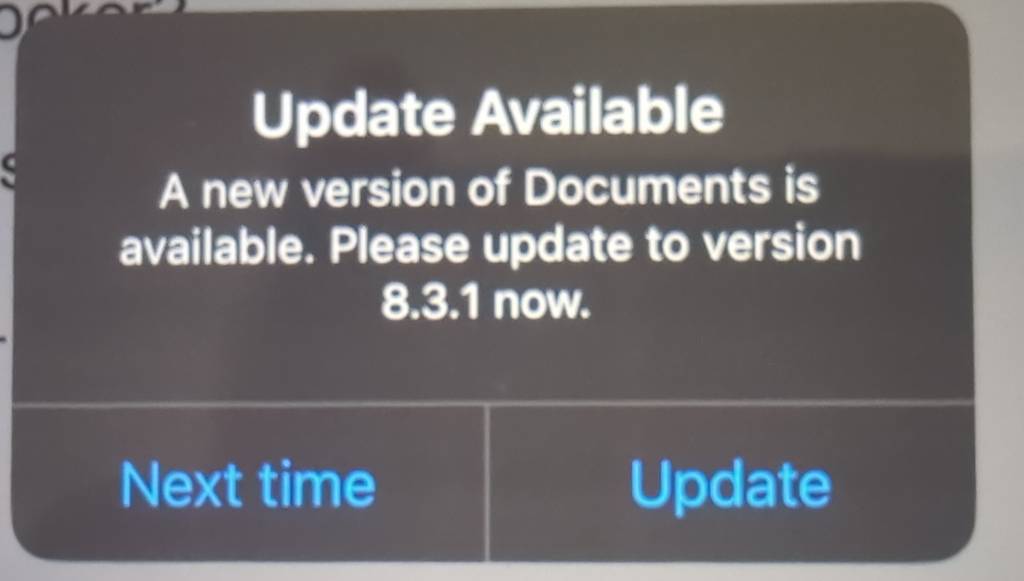
If I'm writing a paper or story or whatnot, I do not want to stop to update the app right now, and asking me every flippin time I go from the research sources to OnlyOffice only makes me want to pull all my support from your nagging shite software. 'Next Time' needs to wait until the next day, not for the next time the app comes to focus. Flippin wankers.
80
I did the cutout (infosec.pub)
submitted 1 year ago* (last edited 1 year ago) by 01189998819991197253 to c/moomin@sopuli.xyz
 

Someone posted a printable cutout of the Moomin House, so I resized it, and had a fun time putting it together.

I cut out the under-stairs door and placed the magic tophat in there.

If there are no objections, I can post the resized version here. Mods, just let me know if that's ok to do.

Edit: By request, please see the pages below. When you print them, make sure they're simplex and all to the same sizing percentage. I happen to have Letter size paper at home (216x270cm, 8.5x11in), so they're sized for that.


I'm looking to host a website for an organisation I run. I'm very familiar with WordPress and somewhat familiar with Drupal, but am highly technical and can learn other technologies. I do feel that a WordPress-type crm might be overkill, as I am not looking for user interaction on the site. I'm good with html, js, and css, so would not be opposed to a barebones provider.

Basically, who is everyone using, and what considerations went into that decision?

I have crossposted this question on .ml, as well, but can't properly link each on the other.


I'm looking to host a website for an organisation I run. I'm very familiar with WordPress and somewhat familiar with Drupal, but am highly technical and can learn other technologies. I do feel that a WordPress-type crm might be overkill, as I am not looking for user interaction on the site. I'm good with html, js, and css, so would not be opposed to a barebones provider.

Basically, who is everyone using, and what considerations went into that decision?

Edit: I have crossposted this question on .world, as well, but can't properly link each on the other.


(Happy new years, mates!)


I vaguely remember this scene from my childhood, and can't remember anything else about it. Does anyone remember what episode this is?

If this is against the rules, please let me know (feel free to delete the post), so I know not to do it again, and accept my apology : /

4
Drowning Pool - Bodies (www.youtube.com)
submitted 1 year ago* (last edited 1 year ago) by 01189998819991197253 to c/gardengrooves@walledgarden.xyz
 

Edit: Another posted this, too. Didn't realize it before I posted. I love this song, and I find it relaxing.


Alternatively, Archive PH link.

42
submitted 1 year ago* (last edited 1 year ago) by 01189998819991197253 to c/moomin@sopuli.xyz
 

If this goes [against] a rule, please accept my apology and feel free to remove the post (or let me know, and I'll remove it).

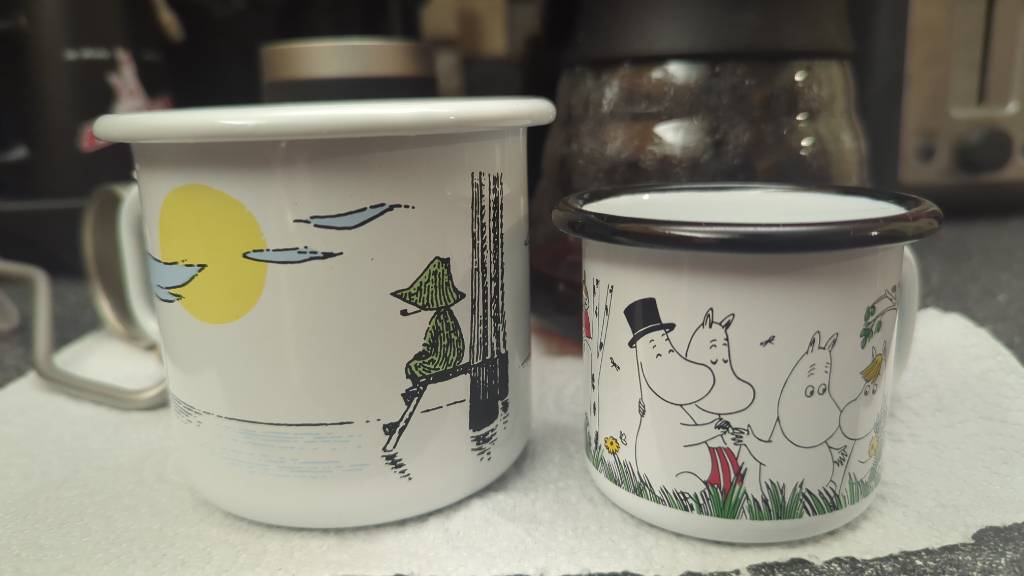
Here are a couple Moomin Valley mugs I received as gifts a couple years ago.

I can't describe the deep calm, reverence, these mugs, and this show in general, invoke.

view more: ‹ prev next ›