It's A Digital Disease!

23 readers
1 users here now

This is a sub that aims at bringing data hoarders together to share their passion with like minded people.

founded 2 years ago
MODERATORS
9826
 
 
The original post: /r/datahoarder by /u/Charcookiecumbs on 2024-05-18 02:47:58.

I’m trying to hoard art , I would always download each drawing and take a screenshot to remember each artists name but now I just take screenshots of drawings with artists @ , yet ended up regretting it after checking how better the older collections looked

Is there a way to download all media of an account or media from a range of time ?

9827
 
 
The original post: /r/datahoarder by /u/the_mcm on 2024-05-18 02:41:05.

I’m about to head off to college and want to have a single place for storage with some redundancy. I know it’d be best to have some sort of offisite backup, but I don’t really have the money for that right now judging by the amount of files I need to store.

I’d mostly be storing a lot of video projects (abt 6tb+ currently), hoping to also do some editing off of the DAS, along with playing and storing a decent bit of dvd/blu ray rips (abt 2+ tb and growing). I’d also probably have a decent but more of other miscellaneous music, videos, etc to store.

Doing some limited research I saw good things about the OWC Mercury quad paired with OWC’s SoftRaid to do a RAID5 set up.

Pricing things out, it seems like I could get 4 WD Red 8tb HDDs along with the OWC enclosure for right around my budget of about $1k, and would give me 24tb usable space.

Does this seem like a reasonable set up for my needs, and would RAID5 be good if I’ll be writing and reading from the DAS often? Thanks.

9828
 
 
The original post: /r/datahoarder by /u/Coolkatisa2511 on 2024-05-18 02:05:14.

Now that the music lawsuit is going to happen, will this be the thing to kill the Internet Archive? Universal is a powerful company with a lot of money and they can easily kill off the website. What do you think will happen if/when the Internet Archive loses?

9829
 
 
The original post: /r/datahoarder by /u/gunzaj on 2024-05-17 23:48:56.
9830
 
 
The original post: /r/datahoarder by /u/jedihermit on 2024-05-17 23:39:07.

I'm looking for something that can select a subset of my rom folder and optionally exclude subfolders from each. For example I want to pick 5-10 folders but omit the video folders in each to save space on the target. These are typically linux systems but I have access to the folders in windows too.

9831
 
 
The original post: /r/datahoarder by /u/Late_Repair_9899 on 2024-05-17 22:40:54.

Firstly, I have found my home.

Secondly, I save hundreds of images and MP4s monthly. I like to see them digitally (and often print them when I can) because they inspire my art and life and imagination (but also who am I kidding it's a part of the hoarding cycle).

I have been using the straight-up Photoshop Contact batch process, but they're always the same size and you can't include the MP4s. I also don't want to spend time on ANY of it (other than satisfying printing and cutting and looking)... so canva templates are OUT.

Anything out there that would automate hundreds of images at once?

9832
 
 
The original post: /r/datahoarder by /u/Pfftwhy on 2024-05-17 21:05:25.

Hey guys, as stated in the title I want to compress a lot of old avi files to a more space efficient format.

I would like to keep as much quality as possible since the files itself are shot around 2005, my main concern is if i further reduce the quality the videos will be barely watchable.

What would be the best way of doing this?

EDIT

Rephrased to make my question clearer

EDIT 2:

Video is interlaced

EDIT 3:

ran mediainfo on one of the files as an example:

Format                                   : AVI
Format/Info                              : Audio Video Interleave
Commercial name                          : DVCAM
Format profile                           : OpenDML
Format settings                          : WaveFormatEx
File size                                : 19.1 GiB
Duration                                 : 1 h 31 min
Overall bit rate mode                    : Constant
Overall bit rate                         : 29.8 Mb/s
Frame rate                               : 25.000 FPS
Recorded date                            : 2004-05-05 12:45:54.000
IsTruncated                              : Yes

Video
ID                                       : 0
Format                                   : DV
Commercial name                          : DVCAM
Codec ID                                 : dvsd
Codec ID/Hint                            : Sony
Duration                                 : 1 h 31 min
Bit rate mode                            : Constant
Bit rate                                 : 24.4 Mb/s
Width                                    : 720 pixels
Height                                   : 576 pixels
Display aspect ratio                     : 4:3
Frame rate mode                          : Constant
Frame rate                               : 25.000 FPS
Standard                                 : PAL
Color space                              : YUV
Chroma subsampling                       : 4:2:0
Bit depth                                : 8 bits
Scan type                                : Interlaced
Scan order                               : Bottom Field First
Compression mode                         : Lossy
Bits/(Pixel*Frame)                       : 2.357
Time code of first frame                 : 00:00:18:20
Time code source                         : Subcode time code
Stream size                              : 18.4 GiB (97%)
Encoding settings                        : ae mode=full automatic / wb mode=automatic / white balance= / fcm=manual focus

Audio
ID                                       : 1
Format                                   : PCM
Format settings                          : Little / Signed
Codec ID                                 : 1
Duration                                 : 1 h 31 min
Bit rate mode                            : Constant
Bit rate                                 : 1 024 kb/s
Channel(s)                               : 2 channels
Sampling rate                            : 32.0 kHz
Bit depth                                : 16 bits
Stream size                              : 670 MiB (3%)
Alignment                                : Aligned on interleaves
Interleave, duration                     : 240  ms (6.00 video frames)

9833
 
 
The original post: /r/datahoarder by /u/learn4r on 2024-05-17 20:55:24.
9834
 
 
The original post: /r/datahoarder by /u/lintstah1337 on 2024-05-17 20:39:09.

I am upgrading my old HDD to a bigger capacity.

I am trying to clone an old HDD (18TB Seagate Exos X18) and would like to only use 1 partition.

The cloning software has an option for "4k alightnment".

Should I use 4k alignment?

9835
 
 
The original post: /r/datahoarder by /u/anestooo on 2024-05-17 19:42:41.

Original Title: Playing around, I've created a Midjourney Prompts Scraper Bot using n8n. 5 topics with 2K prompts per day. You can see demo results on Telegram by username @MidjourneyScraper (Public group: no chats, just a public showcase!). Next, I will improve the bot for personal use by Midjourney Stealth users.

9836
 
 
The original post: /r/datahoarder by /u/vier86 on 2024-05-17 18:54:45.

I am about to embark on a journey to scan and upload a large cache of magazines I have inherited onto https://archive.org/.

The plan is to debind each magazine and scan them on a flatbed Canon CanoScan 9000f.

  • What software would be best to use for this?
  • Should I convert each to a PDF, TIFF, JPEG?
  • Anything else I should know?
9837
 
 
The original post: /r/datahoarder by /u/Hoagiewave on 2024-05-17 18:30:25.

I need help picking out hardware. I'm going to be scanning some prints, I don't need to worry about film. I come from a normal family of illiterates that throw the negatives out when the prints are made. I'm not that close with my family and I'm not going to be inheriting most of these pictures so it is likely I wont easily ever have a chance to see these pictures again when my grandmother is gone.

So while I have the chance I want to do this right and max out the quality of the scans I'm going to get. I've tried to figure this out by myself but it would be nice to get some other opinions. It seems like the Epson v600 might be good enough that it can capture more than enough data than prints can give. The v850 seems have slightly deeper resolution for shades of dark. A decent amount of the pictures will be black and white.

Are there any other options I'm missing? It seems a bit strange that a 15 year old scanner would be the best option on the market. Does the 850 produce tangibly better results? Because of the context I want to do this as best I can now. Lastly what resolution should I aim for to have master scans? Thank you

9838
 
 
The original post: /r/datahoarder by /u/Earbuduserr on 2024-05-17 17:14:55.

Anyone know what to do to get rid of this error?, Ive tried pressing duplicate now and automatically

https://preview.redd.it/auic8rk4s01d1.png?width=662&format=png&auto=webp&s=64fd14123f08670943f29874c76e5f72c4006263

9839
 
 
The original post: /r/datahoarder by /u/requirehelpwithstuff on 2024-05-17 16:53:39.

I searched around and saw some similar reddit posts here so I'm hoping this is my best shot to post it here as well.

I have an old wireless pro that I havent used in a long time, so I swapped the hard drive in it and the wireless functionality seems like it has disappeared. The blinking leds indicates that the device boots and goes solid meaning it's broadcasting wifi, but I don't see anything to connect to. It works when plugged via usb with no issues.

I tried 'updating' the firmware and resetting it, and i think it went thru, but still nothing. The last time I used it, I remember doing something similar and got to a point where i was able to see the wifi but never connected to it (didnt know the password was SN as a youtube guide said it was the ID of the hdd).

Old hardware and don't really expect a hard answer, but any ideas are welcomed.

9840
 
 
The original post: /r/datahoarder by /u/wonka88 on 2024-05-17 16:49:51.

So I’m an unraid fanboy and my case is running out of drive space (10 slots)

I need more drives so I can move stuff around and get bigger drives. But I am also looking into a DIY JBOD enclosure, or at least drive rack.

My PSU is plenty powerful to run everything, but I just can’t get the drives powered. I spent the morning googling and I can’t find any way to run a 6pin PSU cable or a molex cable outside the case. Currently it is just going through a pci opening. But that’s sharp metal and I don’t want to wear the wires. Is there anything that can connect the cables to the outside?

9841
 
 
The original post: /r/datahoarder by /u/slash8793 on 2024-05-17 15:42:45.

I bought what was supposed to be a 22TB Ultrastar HC570 from an Ebay seller. What I received appears to be from a shucked external drive. Before I return it, can anyone tell me if it's just a relabeled HC570?

The model number is WD220EDGZ, and underneath it says "SATA 6Gb/s IU HA570". No mention of the Ultrastar name anywhere on the label. That's fine if it's the exact same thing, but I'm not sure it is. Did I get a lower quality drive? Thanks.

9842
 
 
The original post: /r/datahoarder by /u/AlfredDaGreat25 on 2024-05-17 15:42:15.

Anyone have experience and would recommend an okay no-name USB flash drive? USB 2 or 3

The write speed should be more than 10 MB/s. Thks.

9843
 
 
The original post: /r/datahoarder by /u/zaca21 on 2024-05-17 15:00:36.
9844
 
 
The original post: /r/datahoarder by /u/BananaBus43 on 2024-05-17 14:54:37.
9845
 
 
The original post: /r/datahoarder by /u/AbolishDisney on 2024-05-17 14:37:34.
9846
 
 
The original post: /r/datahoarder by /u/szetadom on 2024-05-17 11:44:57.

Hello!

I'm planning on buying an external HDD to make a backup of my phone, photos, important documents, text files, etc. I don't know how big of an HDD to buy? I think I'll need about 2TBs of storage in the foreseeable future so I was thinking about getting a 4TB drive and call it a day. My question is that is it worth for me to buy a disk with more storage capacity like 8 TB or even larger?

9847
 
 
The original post: /r/datahoarder by /u/InevitableOld3322 on 2024-05-17 11:40:07.

Hi all,

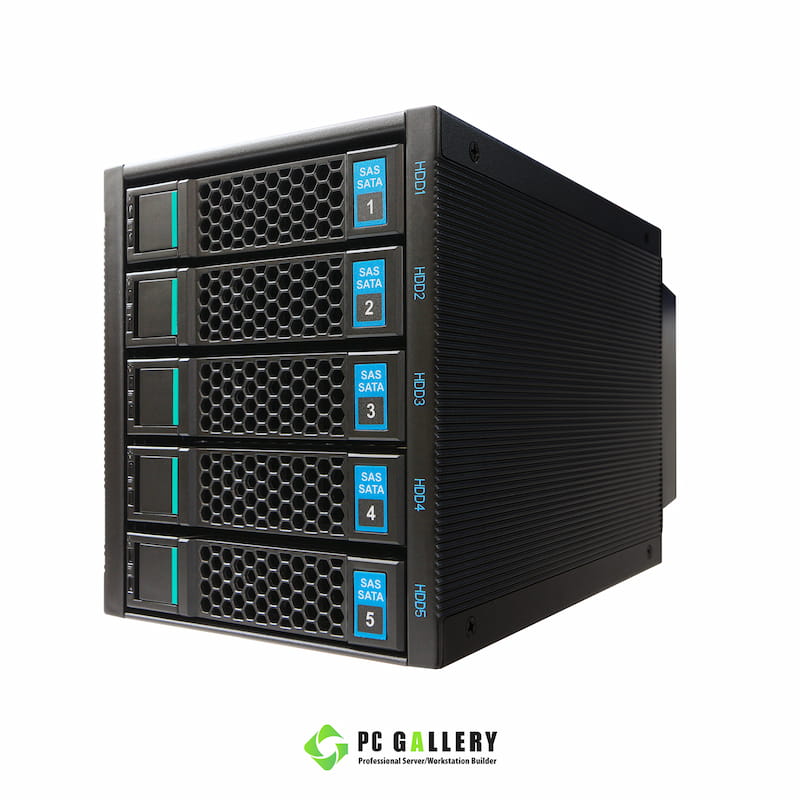
I recently bought some hotswap bays (TGC-H500) for one of my rack mounted servers, but now that I got it, I notice there is a lot of ”flexing” or “free movement” on the bays. Like, I can easily move them around a bit with my thumb. I am wondering if I should send them back.

When I bought it, the bays were advertised as the same type as the Norco 4224 case, which I have experienced to be solid. Though, maybe they got updated, the updated design looks a lot more cheaply made (https://www.pcgallery.co.th/wp-content/uploads/2021/06/TGC-H500-02.jpg).

I am worried about the drives vibrating too much because of it, resulting in reduced performance and lifespan. Anyone here who has experience with these?

9848
 
 
The original post: /r/datahoarder by /u/DismalMathematician3 on 2024-05-17 10:56:55.

So I have a Qnap TS-873A with a number of different Seagate and WD drives varying from 4 months to 60 months old.

I previously had an IronWolf 8TB show some SMART errors ( I can't remember what ones exactly ) but the errors went away when I pulled the drive and ran a full badblocks pass and additional SMART tests. I still RMA'ed that drive though as I'd started the process before the tests completed.

Now, I have another IronWolf 8TB that has shown errors a few times. Here's a timeline:

  • Unrecoverable Read Error at 11800 hours, which triggered a disk replacement with my enclosure spare.
  • Pulled disk ran full badblocks pass and smart tests. Everything came back as have no issues.
  • Swapped this disk back with enclosure spare and rebuilt RAID array.
  • Same 8TB disk shows Unrecoverable Sector Count and Current Pending Sector as 1 (raw value 100) and triggers another RAID disk swap and rebuild.
  • I'm waiting for the rebuild to run another badblocks scan but when I logon today I see that the same drive is showing another Unrecoverable Read Error.
  • In addition to this new error is now shows no Unrecoverable Sector Count and Current Pending Sector errors. The SMART test is clean.

https://preview.redd.it/6wv1ir2ouv0d1.png?width=890&format=png&auto=webp&s=41dc293dcdc21bb3c570f1c0c3c3247a18e597dd

Is this flip-flopping usual for SMART test results? The rebuilds are getting tiresome, especially when they seem to be for nothing...maybe I should make the spare a cold spare, rather than a hot spare.

Anyone have any other suggestions?

On a side note, I have one other IronWolf 8TB, same model, that has given me SMART errors that miraculously disappeared as well. Is this just a "feature" of this model? That makes it 3 out of the 4 ST8000VN004-3CP101 drives I've had that show these same annoying symptoms but the only one that hasn't is still pretty new (the RMA replacement).

9849
 
 
The original post: /r/datahoarder by /u/Torley_ on 2024-05-17 10:43:09.
9850
 
 
The original post: /r/datahoarder by /u/honelnik on 2024-05-17 09:07:29.

I just got a refurbished exos ST16000NM000D (I can't find any datasheet, which quite bothers me) for my elitedesk 800 G4 and I am running the crypto-test from https://wiki.archlinux.org/title/Badblocks#Alternatives .

After the intial 280-ish MBps write speeds (going down somewhere to 200), I am currently running the compare step and again, from 270-280 MBps in the begininng I am hitting 130 MBps speeds after some 13hrs of running:

tps kB_read/s kB_wrtn/s kB_dscd/s kB_read kB_wrtn kB_dscd Device

1079.00 134.9M 0.0k 0.0k 134.9M 0.0k 0.0k sdd

first time I am building a server with such a large drive so I do not have anything to compare it with.

Does it get this slow over sustained read and at the end of a drive?

view more: ‹ prev next ›