It's A Digital Disease!

23 readers
1 users here now

This is a sub that aims at bringing data hoarders together to share their passion with like minded people.

founded 2 years ago
MODERATORS
9326
 
 
The original post: /r/datahoarder by /u/CamT86 on 2024-06-08 00:23:05.

I'm about to start compiling some recipes for offline use(ideally in a way that'll be easy to view on a tablet, either in its memory or from a home server) and i was wondering if maybe there was already something similar thats already been set up, that i could work from rather than start from scratch. I dont really have any bright ideas on how to do this.

In 2 weeks i'll need to go to a remote cabin with really poor internet connection(old style satellite shared between 8 households, thats barely better than 56k... not the elon musk new stuff) and cook for a few families that are also staying out there for summer. I'm sure this time I could literally just bring a cookbook and maybe a few printouts for what i need, but id like to set something up for future use as well.

They already have a small server set up with i think Kodi or plex that gets dragged back to civilization every few months for updates, so i figure i could just add whatever database file/system to that, to also be accessible to the person doing the cooking.

9327
 
 
The original post: /r/datahoarder by /u/JessSerrano on 2024-06-08 00:11:19.

Hello! I have an Apple MacBook and I have the 2TB EasyStore external hard drive.

I plug it in and sometimes it mounts, sometimes it doesn’t. I have another external hard drive (Seagate) that mounts with no issues. I changed cords too and my EasyStore isn’t mounting. Sometimes it does, though, which is odd. The light always turns on when I plug the cord into my Mac. Any suggestions on how to fix this? Thank you!

9328
 
 
The original post: /r/datahoarder by /u/largePenisLover on 2024-06-08 00:05:54.

The only thing missing from my setup is a simple NAS like 4tb volume that I can split into two partitions or shares, running on a very quiet always on device.

I've been looking at NAS solutions for this but these do wayyyy to much feature wise and often have a weird walled gardenish approaches to things.

Like this device that looks perfect, synology BeeDrive, apparently needs to be controlled VIA a synology run web service and has undeletable folders related to photo and video apps. Less idiot proof devices don't have this nonsense but are weird about backing them up.

It all feels very bloatwary to a home-NAS newbie

I JUST need a dumb networked file box WITHOUT all the apps and features QNAP and Synolgoy bring to the table.

I need it to be JUST a network share that I can access from any device on my home network using the file browsers on those devices.

No video managers, DSM's, BSM's, photo managers, or any of the usual stuff. Just files, in a file browser, that I can doubleclick to open.

Jut a dumb, quiet, reliable, file box.

I want to be able to backup this dumb file box by mapping it to a drive letter on the backup pc and then run my backup script.

No bullshit with installing third party synology/qnap/whatever software, I just want to integrate it in my existing backup solutions and ignore what vendors want me to do.

Does anyone know if such a dumb file box is available as an off the shelf product?

9329
 
 
The original post: /r/datahoarder by /u/NZ_I3east on 2024-06-07 23:54:27.

Looking for some suggestions on an online retail other than Amazon in Australia.

I have been eyeing out Seagate 16TB in Amazon but based on the comments I believe they are recertified. I personally don't really mind recertified stuff since the price is decent and I do have backups. I was just wondering if there are other online shops I could be looking that has better deals than Amazon in general.

9330
 
 
The original post: /r/datahoarder by /u/platformterrestial on 2024-06-07 22:48:30.

We powered down an old storage server today and I took a few drives home partially to re-use and partially to check the SMART data.

94568 power on hours, 23 spin ups. Still cranking away happily.

https://preview.redd.it/8hl946jqa85d1.png?width=561&format=png&auto=webp&s=83a0dbd67ebe7397003eb0ad1330daf7c82eb2f0

9331
 
 
The original post: /r/datahoarder by /u/TheDrewCareyShow on 2024-06-07 22:28:42.

I'm starting to run out of space on my two externals and my next step will be starting a NAS, but thats a few months down the road due to the whole money thing. I have about 2TB of game backups id like to temporarily store via a cloud service. I currently have a 150gb plan for Icedrive and was researching an alternative solution and stumbled upon idrive. I subscribed for a month to check it out and it seems more like a computer backup thing. Can I use this for my needs? Im not up on this kind of thing so forgive me if this is a dumb question, google brought me here for similar questions on this subreddit, but not this exact one.

9332
 
 
The original post: /r/datahoarder by /u/mcrsquared on 2024-06-07 21:32:31.

I'm finally trying to do something about my Google Workspace archive, and I'm getting caught in a doom spiral between Google Cloud and Google Workplace support.

I have about 100TB and growing on Shared Drives within Google Workspace (legacy Google Apps / Unlimited / etc.). I want to move it to Google Cloud Storage...according to my calculations, Archive storage will be about 50% cheaper. This is redundancy to my NAS and local backups.

Is there a migration tool to move within Google Cloud (from Workspace to Cloud Storage)? The support flow so far has just activated my Cloud 90-day trial.

I used Syncovery back in the day to get everything uploaded to Drive, but it now looks blocked when I try to sign in with my Google Cloud account. And, of course, moving within Google Cloud would be a lot faster and simpler than downloading and re-uploading.

Thanks, cheers.

9333
 
 
The original post: /r/datahoarder by /u/robdupre on 2024-06-07 21:24:10.

Hi All,

Hopefully a simple question for the experts!

I have a Lenovo M600 on a 1GB home network (could be upgraded to be fair...), its running home assistant, Plex, the arr suit for downloading media and I would like to replace dropbox/google drive and ICloud with nextCloud or similar.

Currently, given the small form factor, I have a 2TB SSD (already 75% full) and a 500GB M.2, running the OS. Currently there is no backup (at the moment this is not super terrible, nothing is that important... yet!).

I would like to increase this storage and add backup. I am not super worried about 3-2-1 coverage, but definitely a nightly backup of everything would be good especially when we move away from the cloud storage suppliers for our photos etc.

So what is the best option:

  • Replace SSD with a 4TB (£225), add a 6TB (£120) external USB drive and manage nightly backups. This is cheapest, but least long lasting the 2TB filled up fast and I expect even going to 4TB will not be enough longer term.
  • Get a 2 bay USB3 external caddy (£50-150???) and add 2 x 8TB drives (£270). Use this as both primary media storage and secondary backup (assume this is not advised? Whats the view of applications like plex running over USB storage...?).
  • Just go with a NAS, in which case id go with a 4 bay something £??? open to suggestions here, 2x8TB £270, in which case it feels the M600 is mostly redundant, i expect this is also the most expensive option.
  • better cheaper and all round wonderful thing I have not thought of?

Be great to have some thoughts.

9334
 
 
The original post: /r/datahoarder by /u/Anubis2k on 2024-06-07 18:41:41.

Hey,

I'm searching for a photo library app that handles use cases where your smartphone has not enough capacity for all your photos/videos but you still want to have all of them accessible.

Essentially:

  • Performant enough to replace the phone's gallery app in day-to-day use
  • Syncing ability (either self-hosted or Cloud-based), including some kind of selective sync, e.g. to keep enough images local to fill a certain amount of space, but automatically remove old ones locally if you take new ones
  • Sync albums
  • Offline support (at least for those that are synced locally)
  • Support of Android, Windows, and Mac OS X (or Web-based for non-mobile)

Does anyone know of an app that supports all of that? I tested out 15+ apps, but none came close except Mylio Photos. Unfortunately, Mylio turned out to be incredibly unreliable, thus not an option for one's most cherished memories.

I would appreciate any and all recommendations. Thanks!

9335
 
 
The original post: /r/datahoarder by /u/d1ckpunch68 on 2024-06-07 21:41:19.
9336
 
 
The original post: /r/datahoarder by /u/ctles on 2024-06-07 21:29:06.

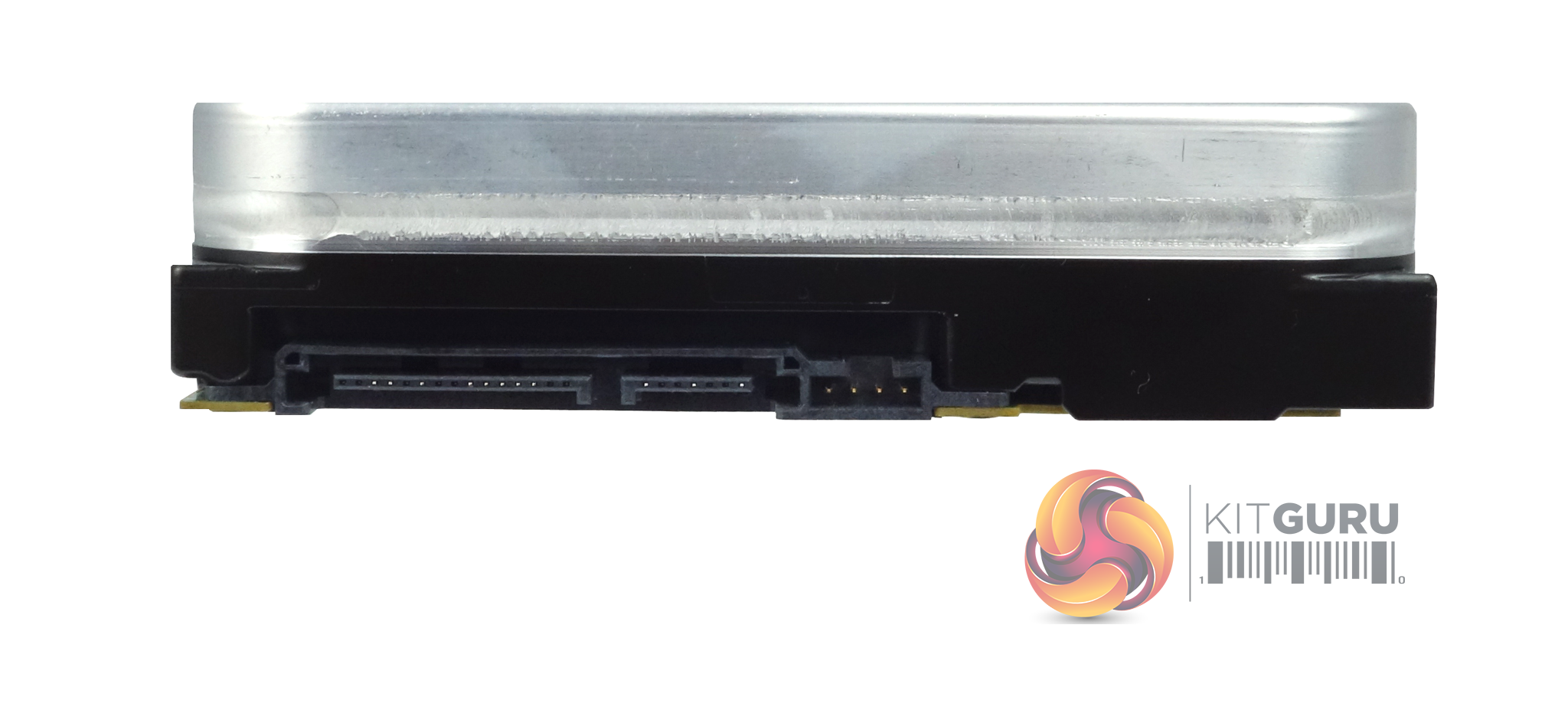
Figured i might try here in that probably lots of people would have the 14tb exos here:

What's the 4 jumper pins next to the SATA data for, see image below. I've looked through the main document i could find and asked a rep in seagate chat but he could only provide me what jumper pins may be for and his doc said the drive didn't have any jumper pins. But clearly they're there:

https://www.kitguru.net/wp-content/uploads/2018/11/Seagate-Exos-X14-14TB-Hard-Drive-Review-on-KitGuru-SATA-Connectors.png

9337
 
 
The original post: /r/datahoarder by /u/ekos_640 on 2024-06-07 21:20:31.

You can still download trailers from Apple though it's just a step or two more now - but they went from 9mbps on their movie trailer encodes since 2005-2006 until about 2022 when they redid everything on their backend and killed the old iTunes movie trailers site and moved it to Apple TV down to 6mbps

Guess they wanted to start saving on storage/bandwith costs over the cost of the old files

This wasn't just for new trailers from then on, but all preexisting trailers too :(

Already have some 'older' movies I added to Plex I could have grabbed better trailers for then but didn't know I wanted the movies yet or changed my mind since I initially saw them :(

We used to live in an age of opulence :(

9338
 
 
The original post: /r/datahoarder by /u/Eidbanger on 2024-06-07 19:07:53.

Searching for a small capacity (due to expecting lower price) flash drive which has fast write speeds. I found a $32 Kingston DataTraveler Max 256 GB with up to 900 MB/s write but curious to hear if there's anything from 500 MB/s write for cheaper (~$10-20)?

I'll be using this for creating bootable ISO images.

9339
 
 
The original post: /r/datahoarder by /u/Rugta on 2024-06-07 18:34:09.
9340
 
 
The original post: /r/datahoarder by /u/Hungry-Sentence-6722 on 2024-06-07 17:25:36.

I’ve seen the direct download page for lib-gen sci-mag articles. I would like to understand how to convert all those files to the correct file name and extension. Libgen desktop is having issues with sourcing from mirrors. I also don’t see the point in one by one files.. any advice? The metadata must be in the sql file but many pdf’s are just a few pages of a large book, I want to merge them all automatically.

9341
 
 
The original post: /r/datahoarder by /u/Starry0Wolf on 2024-06-07 16:36:33.

Sorry if this is not allowed, it is Friday so I believe I'm fine here. This: https://www.reddit.com/r/Roms/comments/1d9sh9r/a_list_of_franchises_removed_from_vimms_lair/

is happening so, I'm going to start searching for these and saving them, Does anyone else want to help with this? I thought we might want to save these, sorry if this falls under rule 8.

9342
 
 
The original post: /r/datahoarder by /u/Applewoood on 2024-06-07 15:26:01.
9343
 
 
The original post: /r/datahoarder by /u/AshleyUncia on 2024-06-07 15:19:29.
9344
 
 
The original post: /r/datahoarder by /u/OverlyBurntToast on 2024-06-07 14:54:02.

I have a bunch of old hard drives, and was wondering the best approach to putting them in some sort of DIY enclosure.

My first thought was to just buy a bunch of the super cheap SATA to USB converters and plug that into a USB hub (speed is a low priority), but that wont be able to power the 3.5 inch drives I have.

I was wondering if I could power the hard drives using a spare PC PSU I have, and then connect the hard drives via some sort of SATA DATA to USB or something.

Does anyone have any ideas or hints, I would appreciate it greatly, as I am not too experienced in this field.

9345
 
 
The original post: /r/datahoarder by /u/Neurrone on 2024-06-07 14:16:37.

Hi,

I'm currently looking to upgrade from an O11 air mini that only holds 4 drives because I realized it would be nice to have more drive slots and inadequate airflow causing some drives to run hot (ambient 28 C, idle 45, 51 under load). I made the mistake of choosing a case that only has as many drives that I had, so wanted to do it right this time. Use case is TrueNas with some apps, running on Ryzen 5700G to optimize for idle power consumption.

I don't yet have a rack, but will be getting one when I move. Hence, I shortlisted some 4U rackmounts to place vertically first on a shelf:

These 4u cases aren't available for me locally - so estimated shipping to get either of those is an extra US$200, though I'm trying to find out if I can reduce that somehow.

On the other hand,, a tower like the Fractal Meshify 2 (US$150) is much cheaper, and available to me locally, so I don't have to pay much for shipping. I could get 3 of these with the money needed to get the 4U.

In this situation, are there enough advantages of those 4U cases to justify the extra expense? If I get a rack, I think I could place the Meshify 2 on its side on a shelf so that it only takes 6U.

I'm new to rackmounted chassis, so these are the pros and cons I'm weighing, let me know if I missed anything.

Pros:

  • Support for redundant PSUs, hot swappable fans and drives for less uptime in case of a failure
  • Support for larger motherboards: I currently have an ATX, not sure how useful support for larger form factors would be if I upgrade to lower end server boards
  • Designed for rack mounting, smaller footprint

Cons:

  • Expensive
  • Requires fan swaps for silence
  • Higher drive temperatures? I assume drive temps would be worse compared to e.g, the meshify
  • Won't fit my 160 mm cooler

Thanks for reading!

9346
 
 
The original post: /r/datahoarder by /u/irocktra on 2024-06-07 11:49:06.

Long story short,

My parents reformatted my old laptop last May 20 and I only discovered it today. Is there a way to recover lost files? Thanks.

9347
 
 
The original post: /r/datahoarder by /u/pele4096 on 2024-06-07 11:07:47.
9348
 
 
The original post: /r/datahoarder by /u/Ben4425 on 2024-06-07 10:40:23.

Nascompares just posted a description of the new Jonsbo N5 case. It's a beast with space for up to 12 3.5" drives and motherboard support for mITX, mATX, ATX, and E-ATX all with full-height PCIe cards.

9349
 
 
The original post: /r/datahoarder by /u/peterinjapan on 2024-06-07 05:06:37.

Hi, I'm having an issue with a RAID with a volume I accidentally erased. My Yottamaster RAID started becoming unstable and was beeping all the time, so after giving up on it, I bought a Logitech enclosure and put the drives in, creating a RAID 5 volume with SoftRaid 8.

After I got everything set up, of my disks disappeared from the new RAID, and as I was verifying the other three, another one gave me issues. So I decided to format the "new" disks and try again. I seem to have had one of the volumes in my old (backup) RAID selected, and erased it.

The backup RAID was, I think, set up as two striped RAID volumes, which were then striped together to create a raid of that. This might not be the best way to do a RAID, but there was no option other than striped or mirrored disks, and at the time SoftRaid was not working with Apple Silicon at all.

I have bought a large external disk to serve as a working disk to hopefully save my data. Can anyone suggest what will happen when I use the Restore option in Disk Utilities? If I can save the files and hopefully the folder structure, that will be good. If there are any other tools besides Disk Utility I should be exploring, please let me know.

Sending the disks to a data service isn't an option as I'm in rural Japan.

9350
 
 
The original post: /r/datahoarder by /u/KWalthersArt on 2024-06-07 04:53:37.

I am posting this so I can get answers while I sleep, I hope I'm not breaking any rules about redundent or stupid questions.

So the problems I have are.

Langrith compression seems to follow a high instance of dropped frames

if I record to long audio and video goes out of sync.

I don't know how to import my files into davinci for recompression in better lossless codec.

I don't know how to install a better codec in VDub

Some tapes have a whine sound on them.

Set up.

Gaming PC Intel Core i7

Diamond VC500 usb card in a high level USB slot.

Internal Hard drive then to external.

Zenith XBR716 DVD-R VCR for play back.

Most tapes are at SLP speed, I was a stupid teenager.

view more: ‹ prev next ›