It's A Digital Disease!

23 readers
1 users here now

This is a sub that aims at bringing data hoarders together to share their passion with like minded people.

founded 2 years ago
MODERATORS
7301
 
 
The original post: /r/datahoarder by /u/Unbannable_Bastard on 2024-08-18 06:44:06.

I saw that recently, WD released a new hard drive being advertised as 2.5 inch and having 6TB of space. I wonder has anyone purchased this drive, if so, can you show the internal connector? I really want to know if this exact hard drive has a normal 2.5 SATA port or some proprietary garbage.

My main laptop is the HP 8770W which has two extra deep SATA ports, which are currently filled with two 4TB 15MM thick Seagate hard drives that I removed ("shucked") from their plastic adapter shells. I really need to find out if this new WD 6TB drive has a normal SATA port because I want to upgrade the storage in my laptop again. If anyone knows about this drive, please let me know, very big thanks.

Here's a picture of the new WD 6TB 2.5 hard drive:

https://i.imgur.com/aJehpoW.png

I'm also aware that Samsung makes 8TB SATA SSDs but those are just ungodly expensive, they will remain out of my budget for a long time.

7302
 
 
The original post: /r/datahoarder by /u/kakashi_1402 on 2024-08-18 06:43:53.

Any fellow data hoarder from India, where can I buy an HBA card to attach more hard drives to my NAS? Are the one available on Amazon trustworthy enough?

7303
 
 
The original post: /r/datahoarder by /u/scphantm on 2024-08-18 04:46:14.

I was getting ready to move my system from windows storage spaces to unraid. Problem is I just found out unraid only supports 30 drives in the main array. Are there any other systems similar that adds the redundancy systems that unraid does with 45+ drives? They are all different sizes, so zfs is out. What else can I look at?

7304
 
 
The original post: /r/datahoarder by /u/The_Internal_ on 2024-08-18 03:29:29.

Greetings all.

Long time Graphic Novel and Video amateur archivist here. Recently had an acquaintence ask for their lifetime of personal and professional photography, as well as their college documents and professional documents, to be organized... and I really am not interested in taking the time to manually do it.

Cautiously optimistic it will be under 24TB, so I'm not worried about the hardware side (probably going to go with a RAID 1 two-drive NAS), but I am curious if folks know of a single software solution for either automatically organizing both photos and documents (and maybe even some videos), or if I'll need to find separate software for each. I've found a few potential solutions for the photo organization (leaning towards Excire Foto 2024 or maybe ON1 Photo RAW), but am just starting research on the document side.

Anyone have similar experiences trying to organize a bunch of random crap that turned out okay?

7305
 
 
The original post: /r/datahoarder by /u/Gskinny on 2024-08-18 02:50:50.

Have 40tb of PLEX movies/shows already downloaded from the *arrs on 2 22tb drives using my Home PC. Looking to upgrade to a dedicated Plex server that consists of a Intel NUC (13 Pro,NUC13ANHi5) and a qnap Rack NAS(QNAP TS-873AeU, $1322) or rack jbod(Qnap TL-R1200C, $909, usb version that plugs into nuc).

Already made up my mind on qnap rack(future proofing, prefer the rackmount to desktop due to spacing, need flat/thin and wide, not square box) and nuc but dont know about nas vs jbod. Theres a 400$ difference between the nas and jbod and trying to figure out if i even need the nas version if i use a nuc. Since the unraid will run on the Nuc and the nas will just be treated like a hard drive, would the jbod version be the same thing essentially since its just being used as a hard drive? They look to have similar features minus all the hardware cpu etc. Just little confused on this and dont know if i need nas since the nuc has all the computing power anyways. Perhaps theres a benefit to using the nas and nuc and a necessity for the cpu on the nas alongside cpu on nuc?

edit: second question, am i able to plug in the hard drives with the content on them right away or does plugging them into the nas/jbod connected the the nuc require a wipe of all drives, meaning id need an additional 2 drives to do the transfer?

7306
 
 
The original post: /r/datahoarder by /u/HowDidYouKillMe on 2024-08-18 02:19:12.

Hello! I recently found myself looking for a way to safely store old family photos, after one of my drives stopped spinning when I tried plugging it in (It was thankfully fixed by professionals!)

After reading around on websites and reddit posts, I think I will try using the 3-2-1 rule with 10tb hard drives. Question is though, will buying cheap drives matter if the same data is stored on 2 other drives? Or should I still invest in quality drives for long term?

Thank you!

7307
 
 
The original post: /r/datahoarder by /u/Shonk_ on 2024-08-18 02:13:57.

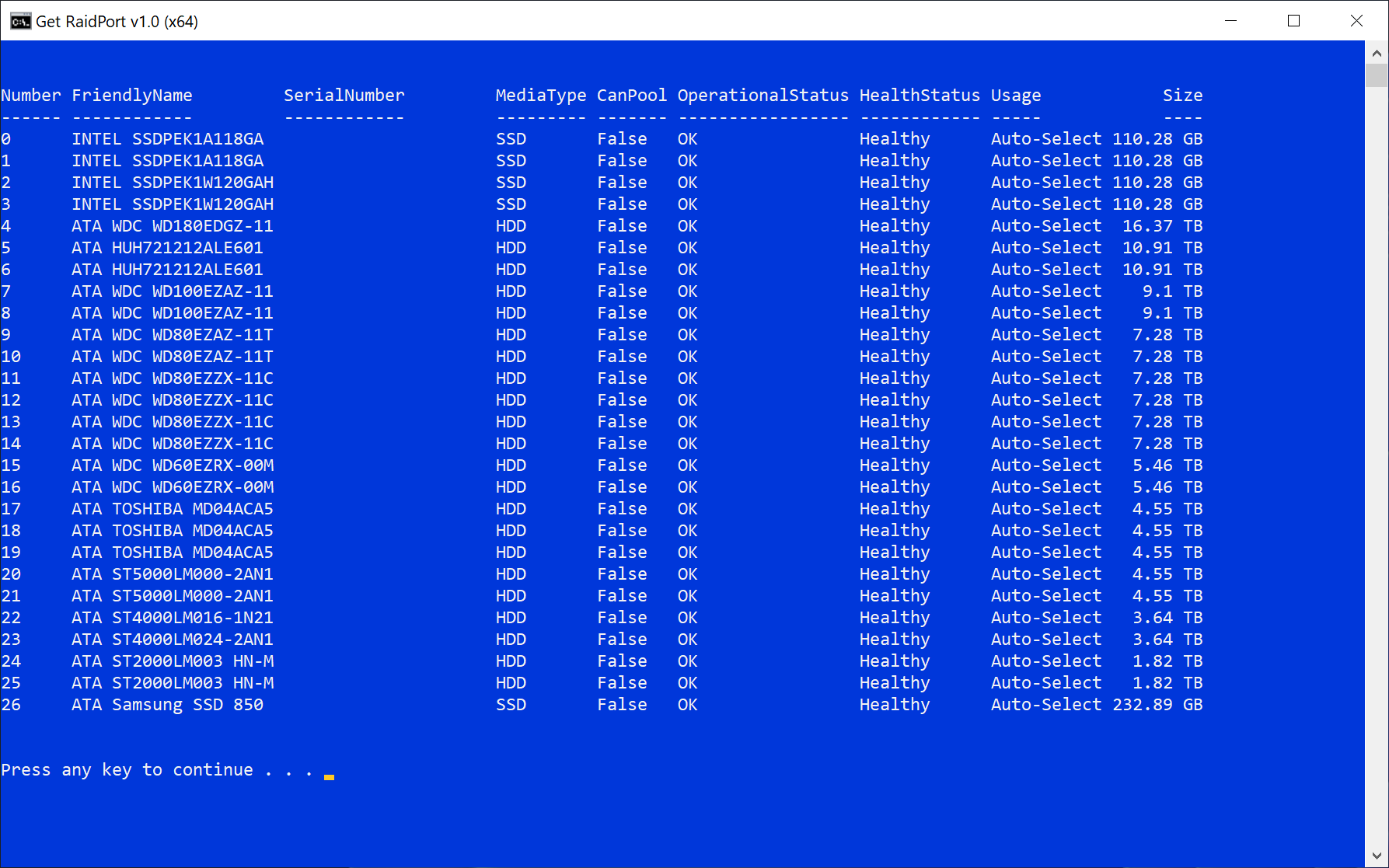
I have an LSI 9305 24i

My first drive on it is a shucked WD White 18TB WD180EDGZ

When it was on the PCH Sata port once in a while the os would send a reset command to the drive

maybe once every few weeks (no issues you would just see it in the eventlog)

since moving it to the 9305 24i a few months ago i havnt had that issue

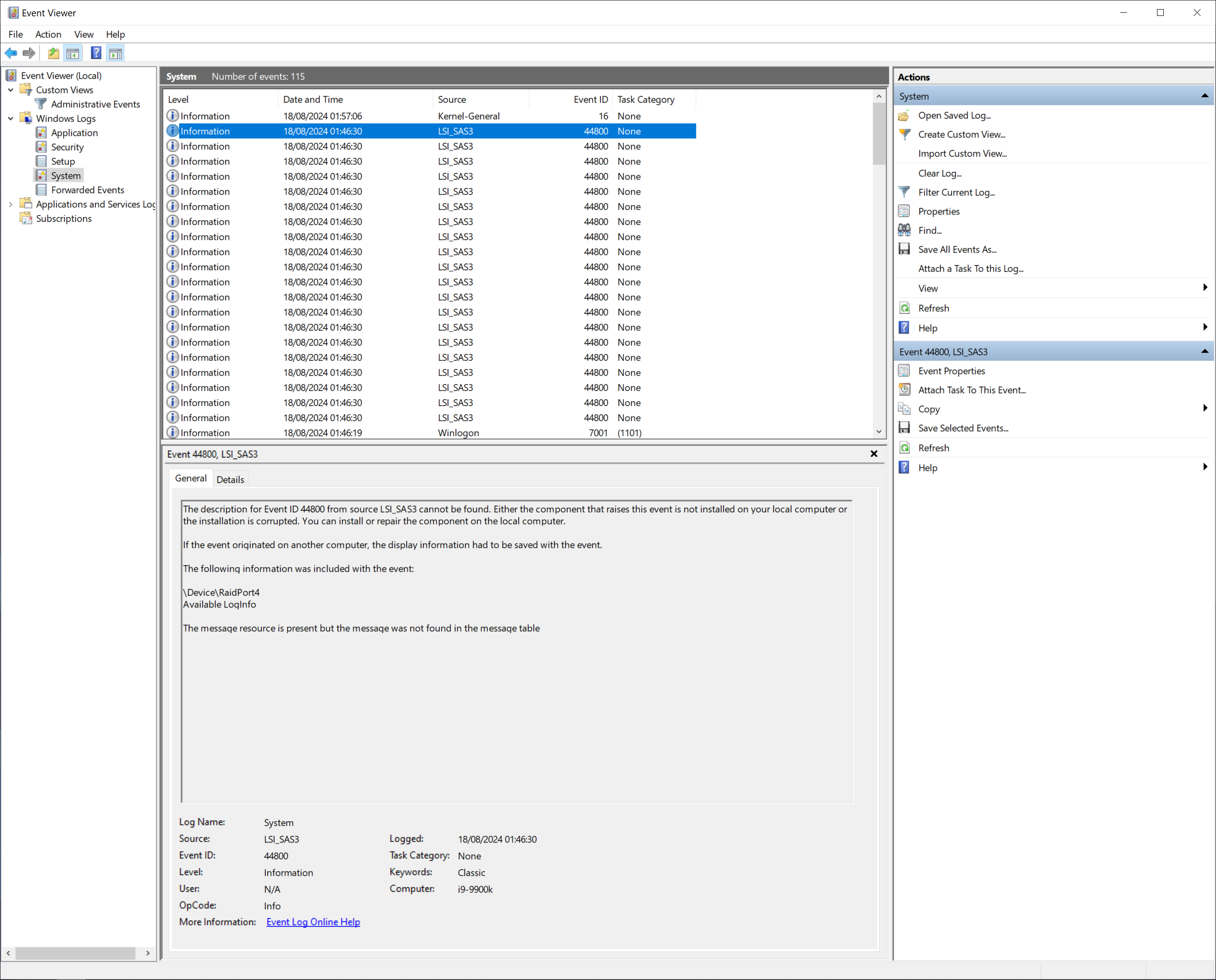
looking through the eventlog today i noticed the sas driver is spamming the eventlog on boot about that drive

The description for Event ID 44800 from source LSI_SAS3 cannot be found

anyone have any idea's?

https://i.postimg.cc/6txZd9Vx/EventLog.png

https://i.postimg.cc/z5gWbLgk/Drives.png

7308
 
 
The original post: /r/datahoarder by /u/Jackie213123 on 2024-08-18 01:47:23.

This concerns Samsung 980 pro which has issues but there are currently local discounts. So I wanted to buy it and install the latest firmware update asap. To do this I need to install windows with samsung magician. I don't have a machine with several pcie slots. So I was wondering if the only choice then, is to install windows on the drive itself to do the update? My main concern is whether the writes from the os installation can do some damage on the drive before I had the chance to update it?

I use linux normally and could boot from usb drive to update it, but alias there doesn't seem to be an easy way to do it for Samsung drives.

7309
 
 
The original post: /r/datahoarder by /u/AtelierIris on 2024-08-17 23:46:07.
7310
 
 
The original post: /r/datahoarder by /u/ScatteredTaco on 2024-08-17 22:56:24.

I'm looking for advice on optimizing my system drive setup specifically for Lightroom editing. Over the years, I've gradually expanded my data pool, and this is my current setup. However, I'm hoping to avoid moving yearly or monthly catalogues due to the transfer speed.

Right now, I've maxed out my 4TB HDD and have started transferring years of photographs to the 1TB HDD to free up space for editing and viewing. It's also worth noting that I'm currently limited to PCIe Gen 3.

My current setup:

  • Samsung 850 Evo 250GB - Boot Drive
  • Samsung 850 Evo 500GB - Games
  • Seagate Barracuda 1TB - Archive Drive
  • Seagate BarraCuda 4TB - Catalogue Drive
  • Kingston KC3000 2TB - Editing Drive

Backups:

  • DS918+ - 40TB - RAID 5 (~29TB)
  • Cloud backup

I also follow the 3-2-1 backup strategy.

I'm looking for recommendations on how I can optimize this setup to make Lightroom editing more efficient without the hassle of constantly moving files.

Got any tips or tricks? I'd love to hear them! And about that culling process—I'm ruthless with missed focus shots but can't resist holding onto my rejected pile. After all, we're data hoarders at heart!

7311
 
 
The original post: /r/datahoarder by /u/fastoy on 2024-08-17 22:56:24.

I have a Windows 11 Pro system with a Storage Spaces two-way mirror. Unknown to me, it was "thin provisioned". It consists of 2 4TB drives giving "8TB" of capacity. I realize that this is really only 4TB of capacity.

I would like to upgrade this Storage Space to 2 8TB drive giving a true 8TB of capacity.

What steps would I need to do to accomplish this? When completed, can I remove the specification of thin provisioning so the true capacity is presented?

https://preview.redd.it/bpi4mubo0bjd1.png?width=1680&format=png&auto=webp&s=effc5e189ab15b464aab5bfb7bc5a025fc92ea26

7312
 
 
The original post: /r/datahoarder by /u/ASULEIMANZ on 2024-08-17 22:47:45.

Like 1.Do you have a will to send your data somewhere like data archive, or leave the computer to someone you know who will send it to them or continue your work? 2.i hope all the data you are hoarding are not password protected, because (not wishing bad luck) after you are gone the mostly likely thing most family do is sell it for cheap, then others would just clean wipe it and sell it, I hope you have a will to tell them what you want to happen to the data after you are gone? 3.also do you upload your data online is that written on manual book for access after you are gone?

7313
 
 
The original post: /r/datahoarder by /u/Servletless on 2024-08-17 19:59:56.

For those not familiar with "culling", here's a typical article from an expert photographer (NO NEED TO CLICK if you already know about "culling").

He writes the word "delete" nine times. Nine. Times. My head wants to explode.

Anybody else know what I'm talking about? How do you manage it?

7314
 
 
The original post: /r/datahoarder by /u/Doom4535 on 2024-08-17 19:45:33.

How do you all clone websites, especially ones that refer to things across other domains (and not end up copying the entire internet?). I'm trying to clone a few websites about some old Legos robots before they disappear, but am struggling to do so. The sourceforge ones have been the hardest as they host the files at a different URL (and I think a few also use a '.io' address as well). I have been trying to use wget, wget2, curl, and httrack to clone them, but none have worked well (wget2 has been the best, but one site seemed to have more luck with wget). However, they all miss most of the actual external downloads and I end up trying to manually download the files and updating the internal links by hand and using awk/sed. I have had no luck with httrack (which I like the idea, but I've had no luck with it).

Has anyone tried to backup similar sites and what tools did you use (and better yet how)? Manually editing and reviewing the contents has not scaled well for me...

The list of sites I'm trying to backup is:

  1. https://brickos.sourceforge.net/
  2. https://bricxcc.sourceforge.net/
  3. http://enchanting.robotclub.ab.ca/
  4. https://lejos-osek.sourceforge.net/
  5. https://philohome.com/
  6. https://www.ev3dev.org/
  7. https://www.instructables.com/Making-8. Mindstorms-RCX-Work-Again/
  8. https://www.johnholbrook.us/
7315
 
 
The original post: /r/datahoarder by /u/alesdi on 2024-08-17 19:38:04.

I’m a musicIan, with a roommate who’s also a musician, and we shared an in home studio. I have a pretty large sample library - around 600gb - that I want to keep on external drives to save space on my computer. I’d like to have two versions of this drive, one to keep in my room, where I produce if the studio is being used or if people are over, and one to keep in the studio and take with me when I’m traveling. I run everything off a MacBook Pro M3Max. I’m someone who really values plug and play so I can just hook my computer into a workstation and go. I’d really prefer not to have to reroute my libraries in my DAW every time I hook up to each of the setups.

I’m frequently adding samples to the library, and it would be really nice to have these two drives automatically share data with one another somehow if possible, but I don’t mind plugging them both into the computer every once in a while to update the libraries to match if I need to. But I’d like my computer to recognize them the same way when I plug it in. It’s worth noting that unless I need to combine the drives manually, every so often, there shouldn’t be any reason to have them both connected at the same time. So with all the background out of the way my question is really what’s the best way to do this?? I don’t mind some front end setup if it gets things working more seamlessly for the long haul. All ideas are on the table but I’d prefer not to have to go buy more hardware if possible lol

7316
 
 
The original post: /r/datahoarder by /u/Jellyphant104 on 2024-08-17 19:23:25.
7317
 
 
The original post: /r/datahoarder by /u/Majiir on 2024-08-17 19:01:29.

I'm looking for advice on hardware for a new 2-bay backup NAS.

I currently have a 2-bay Synology running NixOS Linux and ZFS. Fun fact: You can totally run ZFS on 512MB RAM! Not-so-fun fact: ZFS on that CPU is slow.

I'm looking for a replacement with a similar form factor, but with more modern hardware to shore up some performance and feature gaps.

Requirements:

  • Small form factor
  • 2x 3.5" SATA HDD
  • 1Gbps NIC
  • Not very loud (aside from the drives)
  • Something I can run Linux on, even if some hacking is necessary
  • Either x86_64 or ARM
  • 1GB+ RAM
  • USB port
  • RTC

Nice-to-have:

  • Hot-swap drive bays
  • Secure Boot (or similar ARM feature)
  • TPM
  • Good performance with ZFS for checksums and encryption (for x86_64, that means AES-NI and AVX; for ARM, I think it just means speed)
  • Good performance with Wireguard (hardware acceleration doesn't matter as far as I know, just raw CPU power)
  • 2+ USB ports, at least one USB 3

Not important:

  • Graphics or display outputs (only need a UART/RS232 header)
  • "Hardware Encryption Engine" on ARM (Linux supports these, but ZFS does not)
  • Software (I'm replacing it anyway)
  • Transcoding performance

Other:

  • I have a spare RPi CM4.
  • I have a 3D printer.
  • I'm open to buying used.
  • I'm willing to do some DIY assembly.
  • I don't want to worry about flaky or amateur electronics. (No DIY PCBs for this one.)

Some things I looked at:

  • Another Synology, like a DS723+.
  • A similar QNAP product, like a TS-253E.
  • In both cases, I'm concerned that they may be more locked-down and require quite a bit of hacking. Has anyone run Linux on these?
  • Mini-ITX cases. Most of these seem designed for gaming builds more than NAS.
  • CM4 carrier boards. I didn't find many with SATA ports.

Thanks.

7318
 
 
The original post: /r/datahoarder by /u/joelrusso on 2024-08-17 17:31:22.
7319
 
 
The original post: /r/datahoarder by /u/Danny_No_Arms on 2024-08-17 17:22:48.

Stop me if you've heard this one. I have bitten off more than I can chew. I took on several large boxes of family photos and albums spanning decades, with the promise that I would digitize them for the family. I did this because I knew that if anyone else in my family did it, they would take pictures of them with their phones, put the pictures on a memory stick and probably throw the photos out. I wanted to create a high-quality archive of these photos, so that if someone wanted to print a hard copy, they could have a faithful reproduction of the original. However, here we are a few years later and still I have barely started the project.

I do have what I think is a decent scanner, but the actual scanning is not my problem. It is the overall organization that is the challenge. There are tons of photos, different decades, different sizes, and many may be somewhat mixed up. Some photos have writing on the back, most do not. Some are in albums with writing on the pages. It is kind of a jumbled mess.

The end goal is to have a photo collection that is searchable and organized in some kind of layout that makes sense. I can handle the scanning. How do I go about tackling the associated data? Example: I have a stack of photos of the time we went to Uncle Bob's and Aunt Emma's place at the beach, and there are many family members in each picture. Do I use the photo EXIF data for this? Or the file names? If there is writing on the back of some photos that I want to scan in, how to I permanently associate the files together so that we know image01 contains the description from the back of image00?

Also, because of the size of this project, I will need some software that speeds these tasks up. I know there must be people out there who do this for a living for libraries, newspapers, etc., is there a set of best practices outlined that they use?

Thanks!

7320
 
 
The original post: /r/datahoarder by /u/bob_f332 on 2024-08-17 17:03:29.

Anyone else had this problem? My iDrive backups are able to saturate my upload capacity of just over 3mb/s, but if I create a new file which gets synced to my cloud drive, I get an upload rate of about 600kb/s!

Needless to say, iDrive support have been no help whatsoever.

7321
 
 
The original post: /r/datahoarder by /u/haiku-- on 2024-08-17 15:55:55.
7322
 
 
The original post: /r/datahoarder by /u/igmkjp1 on 2024-08-17 14:44:03.

To be specific, I want a way to tag images that can be understood by multiple gallery apps. Whoever I share my images with probably isn't using the same gallery app as me, and I'm looking for some way that they can still see my tagging system.

7323
 
 
The original post: /r/datahoarder by /u/ZZLIGHTNING on 2024-08-17 14:39:17.

Hi, I'm new to NAS and storage servers. I'm looking to get a NAS to store photos and videos I took, and having the ability to access and view them from anywhere.

Right now I have two options on my mind:

  1. Get a Synology NAS, mainly for the ease of use and setup.
  2. Use my old desktop (i7 6700, 32gb ram, gtx 1070), set it up as a Nas with an os like unraid.

My question is, how hard is it to set up a DIY NAS? What's so I need to do? Where do I learn it? Is it worth the hassle and money saving?

I'm pretty good with computers but never did anything like this before.

7324
 
 
The original post: /r/datahoarder by /u/Best-Mushroom404 on 2024-08-17 14:39:17.

Any have idea if AG638B Witherspoon 12x 1Tb sas. is compatible With DL380 G7?

7325
 
 
The original post: /r/datahoarder by /u/kingman1234 on 2024-08-17 10:35:45.

Background

I'm running a home server with a "file server" set up. Size of the target backup data is around 400 GB only (I know it is small. It contains Proxmox VM backups and my family's personal files on the file share.) The file share is on a ZFS mirror tool. I have already set up SystemD timers to regularly snapshot the datasets, back them up to a restic repository, and sync that repository to Backblaze B2 using rclone.

I'm now thinking of an additional on-site cold backup solution at my home. This on-site backup should be write once read many (WORM) to greatly minimize the risk of any pesky ransomware. I intend to do a manual backup every 6 months to several sets of WORM media. I have searched a lot in this subreddit and I've come up with the following solutions:

BD-R

I'm able to get a USB BD burner for like US$60-90, and Ritek 25GB BD-R for US$13/50 discs. I believe M-Discs is not necessary for my use case as if the discs last for 3 years they will be good enough.

Pros:

  • Real write once media

Cons:

  • The backup will need to be split into multiple discs. It will be a bit of hassle to change the discs to backup. Also it will be a bit of hassle to restore as all discs need to be copied to a hard drive big enough to hold the backup before performing the restore.
  • It feels like it is a stagnant, obsolete technology with fewer and fewer companies producing BD-R now.
  • From buyer's comment, it seems that around 1 in 50 discs will fail to burn or fail verification right after burning, which seems concerning to me.

Hard Disk

I'm thinking of getting an IODD ST400 enclosure (around US$100) for its write-protect functionality, and several 1TB 2.5 inch spinning hard drives (around $40 each) to rotate from.

Pros:

  • The IODD ST400 enclosure can double as a bootable virtual ODD for testing/installing ISOs. (From my experience Ventoy may not be completely reliable)

Cons:

  • Can't find any information on how well the write protection on the IODD drive works. Hopefully it isn't as bad as the write protect swicth of SD cards (which some readers outright ignore them)
  • It also feels like the 2.5 inch spinning hard drives are slowly getting obsoleted (max capacity of drives seemed to be 2TB). I'm avoiding SSDs as they can lose their charge over time during storage. And I couldn't find any USB 3.5 inch HDD enclosures with the write protection functionality.

LTO tape

I know it is the "holy grail" of cold storage. I'm able to find a second hard HP Ultrium 3000 LTO-5 SAS drive for around US$100. Not sure if it is legit. Couple this with an LSI SAS 9300-8e HBA external SAS card, an SFF-8644 to SFF-8088 cable and a couple of 3TB LTO-5 tapes, and it seems to be a workable solution.

Pros:

  • The holy grail as I've mentioned

Cons (or concerns):

  • Unfamiliar technology: I still don't know if the above works. Hopefully someone more well versed in this topic can comment on this. Will the SAS drive works without extra driver on Linux?
  • I also search local forums and I can see additional two concerns mentioned - noise of the drive and longevity of tape in an uncontrolled storage environment. Noise may not be a great concern as I'll be only doing it half a year. But I don't know if the LTO tapes can survive without 24x7 air conditioning (the room can get to around 30 deg Celcius/ 90 deg Fahrenheit and 80-90% RH without air conditioning)
  • Overkill solution to have for a set of data only around 400GB in size?

Thoughts?

view more: ‹ prev next ›