It's A Digital Disease!

23 readers
1 users here now

This is a sub that aims at bringing data hoarders together to share their passion with like minded people.

founded 2 years ago
MODERATORS
7076
 
 
The original post: /r/datahoarder by /u/Del_Phoenix on 2024-08-26 19:00:37.

Sort of new to raid setups. My use case is that I've been collecting minute stock data, some stuff that's not easy to find. These are written at least every minute of the day, and retrieved in a SQL database for calculations for trading algorithms.

Anyway, what I think I've landed on is a raid 10 setup, but additionally writing the real-time data to a third disc which is flushed each night, and doing nightly backups.

This way, even if both mirrors fail, I have a nightly backup, plus that day's data so I would be made whole. Does it sound like a good idea? Is there any type of superior set up I haven't thought of?

7077
 
 
The original post: /r/datahoarder by /u/TomerHorowitz on 2024-08-26 18:42:57.
7078
 
 
The original post: /r/datahoarder by /u/Separate-Effort3640 on 2024-08-26 18:25:37.

What do you think?

https://reddit.com/link/1f1vdub/video/r4n9ml6vw1ld1/player

7079
 
 
The original post: /r/datahoarder by /u/RamityCamity on 2024-08-26 17:39:18.

Using a vga to hdmi powered adapter, displays on uefi boot manager and bootloader screen, will not display bios screen, when cold restarted it goes back to boot screen. Looked around and didn't find much.

Thinking it might be an issue with the adapter, but not sure why it would work for certain screens but not bios.

7080
 
 
The original post: /r/datahoarder by /u/Rabbitstew12 on 2024-08-26 17:28:41.

Hello all,

WARNING, This will sound very jank to some of you heavy hitters, so keep in mind this isn't polished, it's mostly a way for me to learn more and hopefully save some e-waste, please bare with me. I have been trying to research all the different methods out there for pooling drives and mirroring them and best-practices etc and am having a hard time picking which lane to really dive deep on and go for. I would really appreciate some expert advice on if this is a bad idea altogether or assuming it's viable, which direction I should head to learn more on and further flush out. Thanks in advance!

SITUATION:

  • I do repairs and upgrades and often end up with unwanted drives anywhere from 128GB to 4TB (but mostly in the 512G-2TB range). Once in a while someone will want one of the 2-4TB ones, but mostly people don't want used drives (and I don't recommend it either)... So they end up e-waste, which seems such a shame
  • I still have a old mostly-retired media server with 8 sata ports (and bays) that I am thinking of repurposing for homebrew Nas/starter homelab to let me tinker and put these to at least some use
  • I don't have a real NEED for huge capacity or 4x redundancy etc,. This would be NON-critical use. My first thoughts are some entry-level home lab tinkering, maybe a steam-cache, or maybe a NAS for non-critical but occasional convivence use. Some tinkering fun and hopefully use, rather than waste. Any added suggestions are welcome.

NEEDS / WISHES:

  • Absolute 'Needs' are few because I'm noobish to this and I'll keep it non-critical for now
  • Definitely still want some redundancy since they are different degrees of used and more likely to fail than average. Even though I'll keep it non-critical I'd like some buffer against the hassle of just loosing chunks of it
  • If the solution involves Proxmox or similar OS that would be friendly toward other tinkering on VMs or docker type things, I certainly would not object to that
  • The easier/faster adding or replacing drives is, the better!

Rotation of drives will be higher than most people's because A) the different degrees of used are more likely to fail than new B) I don't have 8 saved up atm, so at least at first will be growing the number of drives up to 8. C) Once I max out the sata ports I'll still probably want to replace the smallest or slowest as a better one comes in. Eg. when I get another 1-2TB one I'll probably be happy to pull out the smallest current dirve (say a 250G) and give the new one it's slot. Not talking weekly here or anything, but (especially at first) might replace a smaller one with a bigger every month or two

  • I'm very good with hardware, pretty good with software, but am inexperienced with backup... So doesn't need to be ELI5 simple (and if you tell me X system is a little more complicated, but well worth it, then I'm happy to read more and learn it)... but learner-friendliness wouldn't hurt since a 2nd copy of a select few files on an external drive is all I've ever really needed up to now. BUT with your help, I'm TRYING to get better haha! For fun and tinkering sake at least, and hopefully some practicality down the road ;-)

MY FIRST INSTINCTS: (but feel free to redirect me)

1.) SEMI-MANUAL?:

Seems like anything that automates redundancy of arrays/pools really wants all drives to be the same size. I have found a few things that kinda work around this, but they seem sloppy and not very friendly to even semi-frequent upgrading/replacing of the drives. If I missed a good way, please let me know. But I'm thinking maybe my best bet is to just JBOD the smaller disks into one or two more convenient and usable larger size and keep 2-3 of the largest drives as individuals and just manually backup the JBOD to them for redundancy. Not as elegant or automated as I'd like, but might be the best way to use the smaller ones until all 8 slots are filled with only 1TB+ drives. Thoughts?

2.) DUAL POOL/ARRAY?

If keeping the drives all the same size makes life so much easier that it is all that should be considered, then can that (reasonably) be done in 2 pools? Meaning exclude the outliers from the plan, like sell or save for later the occasional 4tb, and deem that reusing is good in concept, but that anything under 500 isn't worth it. Then could I build one RAID array of 500GB and another of 1TB drives pretty cleanly and effectively? Or does even two get messy fast? Then would probably sort of leap-frog and once I had a few 2TBs, let the 500s go and still keep the array of 1TBs but dismantle the 500s array and build a new 2TB one. Better or Worse idea?

3.) WHAT ELSE WOULD YOU SUGGEST?: Is there's a better whole different direction to head?

That got longer than I meant it too, but was trying to avoid folks needing 6 more followup quesitons before they even could start trying to help me. So thanks for reading through it all. And double-thanks to anyone who can point me in the right direction from here! Cheers!

7081
 
 
The original post: /r/datahoarder by /u/PapiHarambe on 2024-08-26 17:02:00.

Hi, I’m a student nearing graduation, and I’m concerned about losing access to recorded lectures and seminars once I leave. I’d like to download these recordings for future reference. The university uses Panopto for its recordings.

I considered using screen recording software, but given the volume of content, recording everything manually isn’t practical. Is there a more efficient way to download these videos? Any help would be greatly appreciated. Thanks!

7082
 
 
The original post: /r/datahoarder by /u/Ok-Today9251 on 2024-08-26 16:32:58.

I am leaving my country and have to leave behind my TrueNAS server.

I am looking for a more compact way to store stuff which I mostly do not use such as family pictures and stuff like that.

I was thinking about getting some micro sd cards, getting a nice storage case, and throw it in one of my drawers.

Which micro sd is mostly recommended considering reliability/longevity. More storage is mostly welcome too as a plus.

7083
 
 
The original post: /r/datahoarder by /u/clothing_throwaway on 2024-08-26 16:06:50.

Right now I'm just looking for a 2-bay HDD DAS enclosure for my Plex library. Not interested in NAS, not interested in anything beyond 2 slots (for now), so I was wondering if anyone has any suggestions?

Right now, this is the one that caught my eye if anyone has any experience or suggestions.

7084
 
 
The original post: /r/datahoarder by /u/untrained9823 on 2024-08-26 10:31:49.

I've set up a ZFS mirror on NixOS for my parents to keep important data safe, but what's the best way to get notified/alerted to a drive failing or zpool status or smartctl showing errors? Do I just have to check manually every week? What's everyone else doing? I know that you can set up msmtp to send yourself emails with a certain command's output, but that seems overly complicated to use and kind of tedious. Is there a better way?

7085
 
 
The original post: /r/datahoarder by /u/fufufang on 2024-08-26 15:36:48.

I am the author of HTTPDirFS. It allows you to mount HTTP directory listing as a FUSE filesystem. It is an alternative to rclone.

This project got mildly popular. Over time people added compilation support under MacOS and FreeBSD. At some point somebody felt my handcrafted Makefile wasn't good enough. So that person pushed into the GNU Autotools related scripts - the stuff that allows you to do ./configure.

I needed to update the FUSE library dependencies, so I got rid off the Autotools scripts, and I replaced the build system with Meson.

I don't use FreeBSD or MacOS. So I removed the compilation instruction for those operating system from README. I am just wondering if anyone here uses these operating systems, and have to skills to add the compilation instructions back.

7086
 
 
The original post: /r/datahoarder by /u/aywwts4 on 2024-08-26 13:35:26.

Turned my X570 into a homeserver/NAS doing research but a lot of the advice here is years old and mostly points to PCI 2.0 LSI 9200-8i type cards.

Already maxed out 8 SATA ports with 6x 22TB drives in a raid Z2, but the addiction demands more.

My Define 7 XL can comfortably fit about 14 additional drives. but I can always get creative with zip ties and E-SATA...

  • My motherboard has an M2 slot open,
  • 2 x PCI Express 4.0 x16 slots (Runs in 16x and 4x)
  • 3 x PCI Express 4.0 x1 Slots
  • (One of the following (one is running the OS): - 1 x Hyper M.2 Socket Gen4x4 (M2_1), supports M Key type 2230/2242/2260/2280 M.2 PCI Express module up to (64 Gb/s) - 1 x Hyper M.2 Socket Gen4x4 (M2_2), supports M Key type 2230/2242/2260/2280/22110 M.2 SATA3 6.0 Gb/s module and M.2 PC

Looking at SATA expansion slots, most of them look ancient, wayyy too many sata lanes on 1x PCI-E 2.0 seems to be the default, and navigating the ebay-old-server-flea-market is not intuitive.

Trying to find anything to take advantage of modern PCI i came across this, is this a terrible hack?

Put this in the top 4.0 x16 slot...

https://www.newegg.com/asus-model-hyper-m-2-x16-card-v2-pci-express-to-4-x-m-2/p/N82E16815293043

PCI Express 3.0 x16 Supports four additional NVMe M.2, which I then fill with https://www.newegg.com/orico-pm2ts6-bp-pci-express-to-m-2-card/p/17Z-0003-00027 which turns each M2 slot into 6x SATA slots...

Then this in the 4x slot

https://www.newegg.com/p/2S7-09HH-00YG5

With the goal of spacing things out/not maxing out any of this so I don't saturate any lanes when everything is reading/writing at once. There may be software raid0 SSDs in the mix as well.

It seems like these use a lot more modern PCI standards and lanes than a lot of alternatives? Or I could be totally stupid here.

7087
 
 
The original post: /r/datahoarder by /u/SeanBannister on 2024-08-26 12:49:39.

Just a word of warning for those using iDrive Cloud, their syncing service not the backup service.

Over the last few years I've experienced a number of issues with syncing where I've had data loss and files on their servers that don't match what's on the client. When I talk to support it feels like this isn't one of their core services and they're not interested in improving it.

On multiple occasions when doing a lot of renaming and moving files using automated script I've had files just disappear. I'm unsure exactly what causes it but I can tell it happens when there's a lot of file renames/moves it appears the server/client gets confused what's to be synced between systems and stuff just goes missing.

They also don't warn you if there's a merge conflict, if you edit a file on one computer and edit it on a second computer before it has a chance to sync there'll be no warning when you sync that you're over writing a file that's different. This feature should be standard on cloud sync services.

On two occasions the files listed on their server didn't match what's on the client side. They told me to delete everything client side and resync, I did and it didn't fix it. Support ended up telling me it was an issue "on their end" and they fixed it, no mention of what the issue was but you can imagine the frustration this caused having no idea that my files were out of sync, caused 2 days of frustrations chasing stuff.

I don't feel like I can trust their service anymore and will be moving away. Just wanted to leave a warning for anyone else.

7088
 
 
The original post: /r/datahoarder by /u/Kishou_Arima on 2024-08-26 11:18:44.

I bought a 1 year subscription on Reflect Home and I was wondering do I have to manually cancel my subscription if I do not plan on using it after 1 year?

7089
 
 
The original post: /r/datahoarder by /u/ABigRedBall on 2024-08-26 10:21:43.

Decided to export all my Meta user data. Got 4 files using the account centre. The link for the service is "https://accountscenter.facebook.com/info\_and\_permissions/dyi". The 4 Facebook downloads worked but the IG one opens a redirect link with the address "https://www.instagram.com/dyi/?referrer=redirect". This just opens an Instagram user account with the handle "@dyi". Meta's own download service appears to have a broken redirect lol.

Anyway, any alternatives to this anyone knows of?

7090
 
 
The original post: /r/datahoarder by /u/Phil_Goud on 2024-08-26 08:55:40.
7091
 
 
The original post: /r/datahoarder by /u/BikemeAway on 2024-08-26 08:06:04.

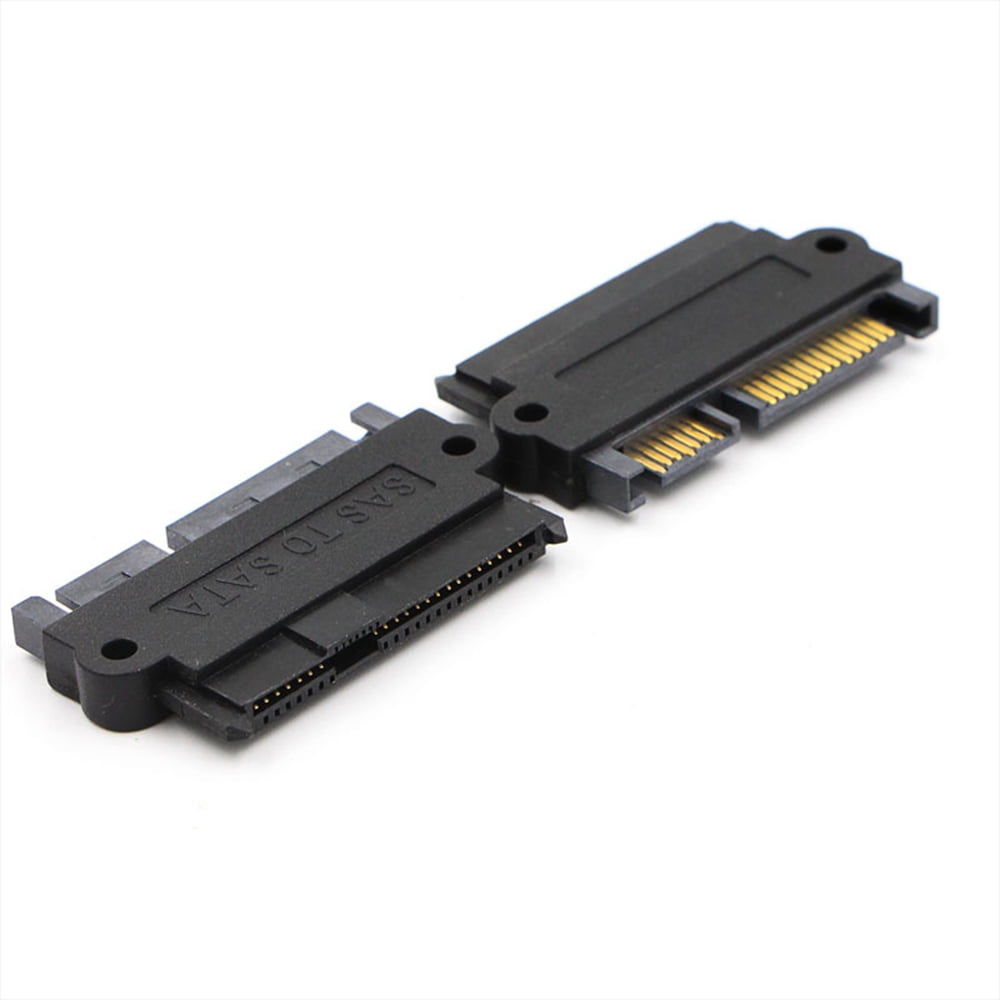
I found very cheap SAS Server HDDs but they have a SAS interface, my (cheap) docking station only has SATA interfaces. https://ae01.alicdn.com/kf/HTB1i9Noi6ihSKJjy0Fiq6AuiFXaI/blueendless-2-Bay-SATA-hdd-docking-station-3-5-2-5-USB3-0-dual-bay-hdd.jpg

Do you think it's impossible in general to attach adapters link this https://i5.walmartimages.com/asr/af171f3c-e236-48d1-8a2c-281b4fb471b7_1.3da4a0343144b7ae26c18be6dcfa381a.jpeg without issue?

Will they fit on the docking station?

7092
 
 
The original post: /r/datahoarder by /u/ReelyInteresting on 2024-08-26 06:56:31.

Not sure if this is the right place to post this question...

I repair a lot of old electronics, many of which are one of a kind. As a result, I've spent many years obtaining rare service manuals that appear to be unavailable anywhere else.

I'd like to start archiving a number of these service manuals to the Internet Archive but, while scanning a normal sheet of paper is quite simple, many have large fold out schematics that just wont fit even a large format flatbed scanner like the Epson 10000XL or similar. Most will be scanned as B&W, some have gray-scale oscilloscope images, and, I mean, I wouldn't mind color support for posters or other large promotional artwork I have.

One option is to use a camera and flat surface, but I really don't believe the image quality is acceptable for something like a schematic. It is extremely important to make out relatively-fine non-text details of complex circuit diagrams or the schematic may be useless or misread.

I've read about large format scanners by companies like Contex and WideTEK, but they're so niche, I can't really find detailed 3rd party reviews about them... They're also really expensive since they seem to be self-contained computers? Does that imply they're worth my money?

Could there be other options that I don't know about?

So I guess my question is two-fold... What is the best large format scanner technology for scanning a large, fold-out schematic and what would be an appropriate (the best) large format scanner model(s) for my needs?

7093
 
 
The original post: /r/datahoarder by /u/NBPEL on 2024-08-26 06:43:00.

Source: https://www.cnbc.com/2024/08/26/who-is-telegram-founder-pavel-durov-and-why-was-he-arrested.html

There's a lot of Telegram Channels with unique content, we gotta backup in case Telegram gets closed.

7094
 
 
The original post: /r/datahoarder by /u/aliencheese4 on 2024-08-26 05:40:05.

I’m not sure if this is the right place to ask, but I can’t stop thinking about the song “Sick Love” by Kriss King. The video was titled “Sick Love (Official Lyric Video),” and I think it came out in 2019 because that’s when I shared it on Facebook. I don’t have the URL or ID, so this seems impossible to find.

7095
 
 
The original post: /r/datahoarder by /u/paradise-coffee on 2024-08-26 02:49:48.

Hi, I've a 10+ year old Seagate harddrive that is seeing more bad sectors recently. I'm transferring the data out now. There was a post asking about what to do with failed drives , what about failing drives?

This is what I've thought of for my Windows OS..

  • cache drive for softwares
  • Windows paging file location
  • temporary folder for torrent downloads
  • mirroring important folders as an additional backup
7096
 
 
The original post: /r/datahoarder by /u/cpufreak101 on 2024-08-26 02:45:40.

MoMath Arcade Collection

I checked the wiki and couldn't find anything quite specific, and it's also clear it's more than a simple "save page as" to get it properly downloaded, I'm sorry if I'm asking in the wrong place but I'm struggling to figure this out.

7097
 
 
The original post: /r/datahoarder by /u/marcal213 on 2024-08-26 02:30:55.

Hey everyone! I'm looking for a desktop external hard drive, not a portable one. I'm looking for one that stays on the desk that I can back everything up onto. I have a smaller portable one that can move with me but I want that backed up. I just had an issue where my portable drive failed in some way and now I'm having to spend hundreds on data recovery to get everything off of it. I just need a fail safe, so I want something reliable. But I also can't afford to spend too terribly much since I'm dropping so much on data recovery. So something maybe not top of the line expensive, but not the cheapest option out there either as I still want reliability. What brands are good to look into? I'm a photographer and I just need the backup so I don't get in another sticky situation like this where I have deadlines and all my photos are held up.

7098
 
 
The original post: /r/datahoarder by /u/HB20_ on 2024-08-26 02:29:43.

I am thinking of importing two Exos X22 from SPD. A friend of mine is coming back from the USA to Brazil in the next few weeks and will bring them for me. Has anyone already done something like this? My fear is that I might receive a dead hard drive and won't be able to claim any warranty because of the location.

7099
 
 
The original post: /r/datahoarder by /u/Sufficient_Humor1666 on 2024-08-26 02:19:01.

Hello,

Noob here. I'm sure that this has been asked before, but there seems to be a lot of backwards and forwards on reddit posts.

I have personal data (2 to 4TB) that I want to back up VERY securely in the cloud - and I have my media server (8TB) that I do want to back up but is less important.

The choice seems to be Backblaze Personal Vs Backblaze B2? vs Idrive Vs Crashplan - and I have no idea what is better for what.

Any recommendations?

I realise that I might need to have a different plan for the two types. I was going to go with backblaze and their unlimited storage..and pay extra for the longer retention but then some seem to say it deletes things - and they also dont seem to cover NAS and its per PC. If I lose some movies it's not a big deal but I cannot lose the personal files!

So then I thought Idrive would be good (pay for the 10TB), accepts NAS etc...however some say it just keeps duplicates of files.

Crashplan I have no idea if its any good.

Help! I'm confused and going around in circles.

7100
 
 
The original post: /r/datahoarder by /u/Sebasvg312 on 2024-08-26 02:11:38.

hey so im in the middle of building a Jonsbo N3 NAS as an upgrade to mi mini pc nas i completely filled. I'm stuck on picking drives. I've narrowed it down to these three, because of shipping costs to my country (anything under $200 gets free shipping and free import taxes):

  1. Western Digital 10TB WD Red Plus NAS
  2. Toshiba N300 10TB NAS
  3. Seagate IronWolf 12TB NAS

Has anyone used these drives before? Which one would you recommend? I'm looking for something reliable that's also good value for money.

Thanks for any advice you can share!

view more: ‹ prev next ›